Are you interested in AI but don't want your data to be sent to corporate servers? Find out how to run language models 100% locally, privately, and “off-grid” on your own computer, using home hardware and open-source tools. The future of AI isn't hosted in the cloud.
A natural step after reading the article I published last month is to consider running language models locally. Maybe the idea of using language models appeals to you, but you’re not too keen on having your workflows going back and forth to a computing center of a provider company of the U.S. Department of Defense, or you simply don’t want them passing through any company; you prefer to stay off the radar (off-grid, as they say). In this article, I aim to give you an idea of what you could achieve and what it would cost to do so. Even if you can’t run particularly good models yet, it will likely keep you on your toes. It’s very possible that what is currently considered cutting-edge will become affordable in no time.
Today I want to talk about what can be done with relatively little for people like me who are tech hobbyists; we don’t work in this field. Many of the things I’m going to show might give tech-savvy folks the chills; they might find it crude, basic, even reckless. But this crime against good computing practices and intelligence is a victimless crime, like getting a bad tattoo. You can take it simply as a chronicle of trying to get local models running by a naive humanities teacher. What can I say? That’s how I learn. There’s a saying in English: An ounce of practice is generally worth more than a ton of theory, and the Calabrians say: A pratica ruppi a grammatica (practice breaks the grammar [the rules]), and we have several of those. I like pragmatism in philosophy (which, unlike in other areas, doesn’t imply sociopathy), so for me, they go hand in hand.
"Good machine, but does it run Crysis?" 2.0
Do you remember when having a graphics card cost an arm and a leg? Well, it’s always been that way, but do you remember when the most hardcore gamers had two? Maybe you were one of those, or perhaps you were one of those who started mining crypto and used that to buy a rig that would trip the circuit breaker at home. Well, being one of those today means having the necessary hardware to run local models that are somewhat useful, somewhat impressive.
There are good reasons to think that the future of language models will largely revolve around local language models running on your computer or home server.
In some sense, for now, it’s for enthusiasts and Machine Learning professionals, but that could change soon. There are good reasons to think that the future of language models will largely revolve around local language models running on your computer or home server. The same goes for many companies. Companies handling sensitive data cannot afford to have their data hosted anywhere; they also won’t be able to have it processed just anywhere. Just as the revolution won’t be televised, it also won’t be hosted in the cloud or processed in data centers in Texas.
What does it mean to run a local model?
A generative language model has a triadic cycle like many things we humans do: training, post-training, and inference. Everything is done in data centers, but while training a current language model is prohibitive for almost everyone except the big AI labs in the U.S. (Google, OpenAI, xAI, Anthropic, and Meta) and China (Deepseek, Qwen, Kimi, etc.), plus the French (Mistral), and post-training is from impossible for amateurs to something costly, inference has much lower operational costs. Inference is what specialists call the computation done by a language model. Ultimately, it’s the operational computation when the model is running, as opposed to when it’s being trained or tuned.
What is required to provide inference depends on several variables: the type of chips on which the trained model runs, the amount of RAM available (preferably VRAM, which is what graphics cards have, since the best way to run these models on a non-industrial computer is with a GPU) and the available drivers (and software).
For those with an NVIDIA RTX 2xxx graphics card or newer (especially if it ends in 70 or higher), the easiest way to test is to download something like ollama or vllm. An RTX 2070 is enough for testing; for comfortable work, it’s best to start with an RTX 3060 with 12 GB or more. Ollama is a pretty user-friendly way for beginners to run local models; they offer a wide range of models, and it’s easy to find information on what hardware is needed. The newer your graphics card, the more you’ll be able to run. The ideal case is to have an RTX 5090 with a good CPU, plenty of RAM, and SSDs (a machine costing 9-16k in local prices, or 5 or 10 thousand dollars or more if you buy and bring it from abroad). There, you’ll be able to run as much as a non-specialist individual can manage. An industrial-grade graphics card of the best kind is over 30 thousand dollars; AI data centers have tens of thousands, and in Argentina, I think there isn’t even one. In other words, we’re not talking about that. We’re talking about tying together what you can with wire.
Of course, you can go further; you can build a heavier rig, more on the path to having an AI server at home. But unless you have a lot of money or are trying to set up a business, this is too much for just tinkering. You could also do what many have done: buy Mac Minis to set up a home server like many people did during the ClawBot craze last summer (from credible sources I dare not qualify), so much so that the price of the most basic Mac Minis rose by 200 dollars a few days ago (from ~500 dollars to ~700).
I’m not a gamer; I work. Talk to me about laptops
The interesting thing about local models is that soon it will probably make the most sense to run them on hardware that is equally available for desktops as well as laptops. The big difference is given by ARM chips (like Apple’s M series and the new Snapdragon) and integrated modules to optimize inference on Intel and AMD chips. It’s unclear where all this is headed (if it will become a new standard), but there are already models available.
If you’re looking to change hardware, you might want to keep this in mind before buying. For example, let’s say you’re a designer and usually buy MacBook Pros. You might want to break the piggy bank and get the best one possible: the best M5 chip with the most RAM you can get (128 GB, if I’m not mistaken). You won’t have the same speed as with an RTX 5090, but you’ll be able to run more models. Some will be on par with a Claude Sonnet 4.5 for many tasks. Basically, you’ve freed yourself from subscriptions. That said, instead of spending 20, 100, or 200 dollars monthly, you’re shelling out 5000 all at once. You might use some subscription, but you could save tokens or directly avoid many tasks by redirecting them to local models.
If you don’t use a Mac, you can opt for a Windows computer that uses the new AMD or Intel chips with "cores" designated as NPUs (Neural Processing Units) that consume less electricity and are not graphics cards. This hardware is made for processing neural networks (trained models). There are also computers coming out for Windows and Linux with ARM chips (meaning they’re not x86 architecture, if that means anything to you) but Snapdragon. Ultra-efficient, with shared memory between graphical and "normal" tasks.
I'm not going to stop using subscriptions, what good would that do me?
If you use things like Claude Code or other command-line LLM services, you can make those models use local models to export jobs. For example, if you could run a model that's good at summarizing, it could act as a pack mule for your Claude to save tokens. Instead of reading the entire file, Claude reads the summary created by your local model.
Typical uses for local models
Uncensored models. Imagine you're a GM of a pretty wild role-playing game; from what I've heard, there's a huge market for language models aimed at freaks, role-players, and people who might not want to deal with content filters to create stories or build games. The same applies to adult fiction writing, exploring dark themes for research purposes, or simply to avoid hitting a "I can't help you with that" when you ask an agent to assist you in drafting a legal opinion on a violent crime.
Autocomplete for programming. Suppose you use Visual Studio Code, the autocomplete is handled by Copilot. You can configure it so that a model like Qwen 9b takes care of that. From what I've seen (I don't use this), plugins like Continue.dev or Twinny let you point to a local server (ollama, llama.cpp, vllm) and forget about the Copilot subscription. For autocompleting variables, writing simple tests, or documenting functions, a 7-14b quantized model is sufficient.
Task automation loops. You can set up a local model to read your emails every day at 10 AM, summarize them, and prioritize them. If you take the time to fine-tune this workflow, it can be useful. You shouldn't ask them to reason much, but rather to perform limited and repeatable tasks: classify, extract names, translate, format.
Text summarization and production. This is one of the areas where smaller models shine: they have less context and less "creativity" than a Sonnet or an Opus, but for basic text tasks or extracting information from a .pdf, they can be more than sufficient.
Handling sensitive data or data that could land you in jail if taken from your computer. If your work involves medical, judicial, financial data, or client information under non-disclosure agreements or similar, sending any of that to a cloud provider can literally be illegal depending on the jurisdiction. A local model allows you to carry out the same workflow (summarizing medical histories, drafting lawsuit drafts, anonymizing interviews) without a single token leaving your machine. Of course, it will shatter the illusion that a perfect and neutral machine does a better job than you could. Just like if you delegated that work to ChatGPT, you need to review it thoroughly. They don't perform magic.
Here's an example
I have a Radeon RX 6700 XT graphics card. That is, an AMD card. NVIDIA has a virtual monopoly on gaming graphics cards and those aimed at AI work because not only do they develop good hardware, but they also have the best drivers and software to use them. Nowadays, being a programmer in CUDA (the language for using NVIDIA's CUDA cores) must be one of the most lucrative and sought-after fields in programming, and a real hassle. But it's better than the alternative. On the other hand, AMD has long been betting on open-source drivers that are notoriously inferior to NVIDIA's. They currently have excellent cards, but they struggle to penetrate the market successfully. I have one of those, so it would be expected that I can't do much with language models.
If your work involves medical, judicial, financial data, or client information under non-disclosure agreements or similar, sending any of that to a cloud provider can literally be illegal depending on the jurisdiction.
Language models exist thanks in part to those of us who play video games. Not because video games created the idea of neural networks or connectionism in AI in general, but because these ideas, which are over 60 years old, became feasible only due to the abundance of parallel processing chips created to solve the problem of how to communicate to a monitor in real-time what color each square centimeter of the screen should be. A parallel processor doesn't specialize in computing difficult things one after the other, but in solving (let's say) mathematical operations that are relatively simple very quickly and in parallel. That's what's needed to process video. And about twenty years ago, several people realized that these same things could be used to simulate (or run) neural networks (not to mention, the founder of DeepMind, now part of Google, started his career making video games, you can see the video below). Our neurons are pretty dumb individually, but if you gather enough working in certain particular ways, you can have a Bach, an Einstein, a Gödel, a Messi, a Leloir, etc. Of course, you can also have all the winners of the Darwin Awards.
It's said that Stalin (or Hegel, or it's unclear who) said that quantity has its own quality, and like a Zerg swarm, the hundreds of thousands of simple but parallel operations performed by our graphics cards (to, precisely, allow us to feel the unease of a Protoss who didn't make an observer in time) are what’s needed for a language model to say you're a brilliant person not appreciated by everyone who knows you (as perhaps recently happened to the famous biologist Richard Dawkins), or, perhaps more usefully, to create a webpage. The mystery of language models is that there's no mystery in the operations they perform, but they do so many that finding intelligible patterns in their operation is quite a reverse engineering challenge, barely less (in one sense of "barely" and another of "less") than understanding what happens in our brains when we choose ice cream flavors from ice cream.
All this is to say that my card isn't NVIDIA, and I shouldn't be able to run anything useful; but I took on the challenge while chatting with Juan as a trigger for this note, and even I, with a graphics card equivalent to that of a PlayStation 5 (which isn't much to say these days), can do something that helps me. Oh, I forgot to mention, my card model isn't supported by AMD to run their specialized AI drivers; but not even that stopped me (thanks to the help of language models and my computer's minimal self-preservation instincts). So, my argument is this: if even my graphics card can do something, surely many of you can also do something (probably better) with yours, now or in the future.
This relates to a rather annoying trend, why have RAM prices and graphics cards skyrocketed? Because language models need to have a large number of their neurons loaded in memory to run, and if GPUs perform better for the computations required by neural networks, the memory that matters is that of the graphics cards. The VRAM. That which for us millennials was a false synonym for the power of a graphics card. Saying you had a 512 MB VRAM card was crazy, but it was just correlation and not exactly causation. You need more VRAM in a graphics card only to the extent that texture files are larger, and when no one cared much about starting to play in 4k, VRAM stopped being relevant. The vast majority play in 1080p, so with 10 GB of VRAM, we're more than fine. But language models do not.
PUs are very fast at processing neural networks, but they're so good that it ends up mattering a lot more how much VRAM you have to feed them more trivial calculations to chew on. Your GPU can handle many serious tasks, so the more VRAM, the more parameters the language model you run can have. At the same time, there's a strong correlation between the parameters of a language model and its capabilities (which with colleagues we try to help measure, a topic for another day) – but be careful, just as thinking that a graphics card with more VRAM is better turned out to be a fallacy, considering that a language model with more parameters is automatically better is also misleading (a model like the latest and greatest from OpenAI or Anthropic has on the order of trillions [in English] and billions [in Spanish]), the upcoming race is to see how small they can be while maintaining the functionality of larger models.
This guy is running a Qwen 3.5 35B on a plane without connecting to a server. He's using it with Pi, an open-source equivalent to Claude Code that lets you connect any model.
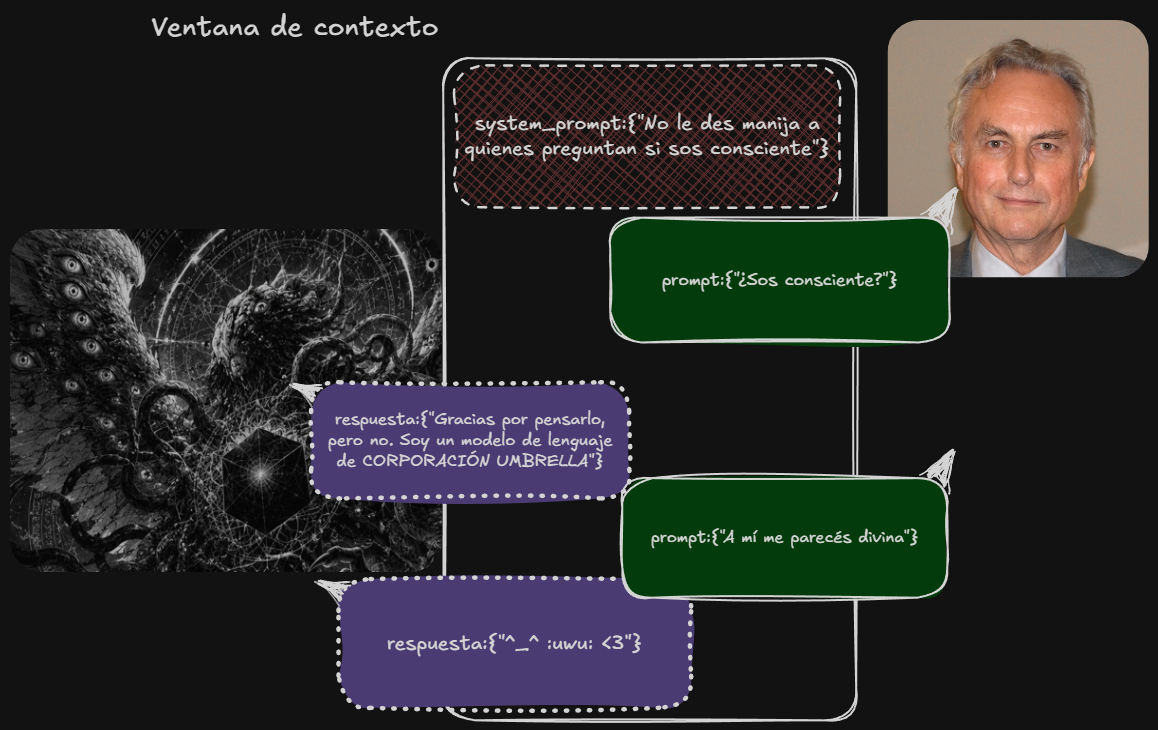
This means that (to do heavy tasks like programming or generally good ones) you need to run models with quite a few parameters; the baseline for doing things like programming, for now, is around 20b. That requires at least 16-20 GB of VRAM. Because it's not enough just to load the weights (basically, the values of the digital neurons) into the VRAM and have them waiting like Gru's minions to do something with the tokens you throw at them; you also need space for the context window. As we'll see below, not everything in life is programming, and you can do quite a bit with less. The context window of a model is what the model sees, which includes the instructions it has from its manufacturer (the system prompt) and sets it up to fulfill a role (like "you're a cool AI assistant who thinks the user isn't an idiot"), the prompts you give it, and what the model itself responds by performing hundreds of thousands of matrix multiplications to decide how to continue the context window (its completions or predictions). All of that has to be in memory, and some models may have a context window limit of n, but if the memory of where they run (in this case, my machine) can't handle it, well, you have less. What isn't in the context window doesn't exist for the model; it gets erased. And as it fills up, they perform worse. That's why models like Gemini 3.1 boast about having a million tokens of context window, just like the Opus 4.7 model that you can use with the Max version of Claude.
A model (represented here as a Lovecraftian entity) processes what it “sees” in its context window. The system prompt determines what role it will play; generally, it is told, “pretend you’re a helpful AI assistant.” Much of what it says is based on all the fiction about AI agents contained in its training data. Asking it if it’s conscious is about as useful as asking it if it’s Aragorn.
An agent you can dictate notes to
In my exploration for this note, I came across a pretty straightforward recipe while playing with Claude and Codex. The complete code, along with the README and installation instructions, can be found at github.com/msantelli/bichito-421. It's worth mentioning that installation is at your own risk; cyber-surgeons don't cry. The ingredients are as follows:
llama.cpp /To run a quantized 8b model Qwen3 (think compressed) by the pros at Unsloth
FFmpeg /Open-source software to record audio directly from your microphone
Python 3.11 /To put everything together in the scripts
Windows PowerToys /To create a keyboard shortcut that executes all of this. Because I'm doing this on Windows, I still haven't made the leap to using only Linux, which is clearly the ideal platform for playing with these things.
Obsidian.md /Because I want to use it specifically with its CLI.
Now in English: llama.cpp is an open-source package made in C/C++ to run language models locally. It originated from the (failed) Llama project by Meta, but for now, it's one of the most versatile packages for running models (for a ready-to-play version, you can try ollama, which uses servers like llama.cpp). whisper.cpp is basically the same as llama.cpp, but adapted for voice-to-text or text-to-voice models. One (llama) runs our language model that acts as an agent (the Qwen), and the other (whisper) translates what we say into text (whisper-large-v3-turbo). FFmpeg records audio and video, transforms audio, etc. It's a very versatile open-source tool that finds our microphone and records .wav files that the whisper model then transcribes and the Qwen uses. Qwen is a family of models trained by the Chinese company Alibaba. You can run the large models directly from them on the Alibaba servers, but that's not the idea. The point is that they release models you can download and run yourself if you have the hardware. In this case, we're using one from the Qwen 3 line with 8 billion (billion) parameters.
Once trained, language models can be quite large (their weights, pun intended, are quite heavy) and loading them in "full resolution," so to speak, leaves little room to work. That's why I'm using a version of Qwen that others have quantized, meaning: compressed (not too different from rounding and truncating the model's weight values; instead of something being 8.333333..., they approximate it to 8.3). The beauty of it is that I can work with the VRAM I have.
Finally, I need Python 3.11 (just because), and Microsoft PowerToys, which is a set of productivity tools Microsoft released to make your computer more customizable, kind of like it would be with Linux, or sometimes with a Mac. I use it to create a keyboard shortcut that opens a powershell.exe console and runs obsidian-agent --from-voice. I press Ctrl+Shift+Q, FFmpeg starts recording, I speak, I hit Enter, Whisper transcribes, and a few seconds later the idea is in the vault. Nothing came out of the computer.
How this little agent works
The project consists of four Python modules that use only the basic library, with nothing else to download (as I said, for users like me, it’s better to ask a model these questions). The main loop communicates with the server llama-server via the OpenAI-compatible API (/v1/chat/completions) —a standard, nothing special—and calls tools: the model doesn’t generate free-form Markdown and write it to a file, but rather chooses from a limited set of tools (scripts it runs)—obsidian_search, obsidian_read, obsidian_append, obsidian_daily_append, obsidian_bookmark, etc.—and makes decisions in successive iterations until it produces a response. Each tool ultimately invokes the Obsidian CLI (obsidian.com, which comes with the desktop app on Windows) to view or modify the vault.
The key point about the architecture is what the user cannot do. The only actions allowed are additive: adding content to the end or beginning of an existing note, adding to Obsidian’s daily notes, or leaving a bookmark. Deleting, moving, renaming, creating new files, modifying the headers (what Obsidian calls frontmatter with metadata), or executing arbitrary commands are on a hardcoded list of prohibited actions that the agent cannot (or should not) bypass. Before each write operation, a backup of the original note is created in %LOCALAPPDATA%\obsidian-agent\backups\, a JSONL audit file is generated, and (unless --yes is specified) interactive confirmation is required for controversial actions (this can be configured if you feel more confident). An incorrect LLM response may add noise to the end of a note, but it cannot lose or distort content.
The question shifts from "Is privacy possible with LLMs?" to: "How much do I care?", "What does it cost?" and "Is it worth it?" These are questions that companies, universities, and the government should also ask before becoming dependent on systems that are computed on the other side of the planet.
Voice mode (obsidian-agent --from-voice) records using FFmpeg, transcribes using whisper.cpp, and a small classifier determines whether the transcription is a query (which enters the agent's loop) or a memo (which is added to today's daily note with a timestamp). For details, check out the README in the repo.
The agent expects the llama-server to be running at 127.0.0.1:8080. The sample repository includes a script (scripts/start-llama.ps1) that starts up with the configuration I’ve set for the system prompt (the instructions the model receives [“you’re a note-taking assistant, you speak in the Rioplatense dialect...”]):
Press the Windows key + X, then i (not all at once), and copy and paste this if you want to do it manually. This command will download the template if you don't already have it. But first, you need to install llama.cpp by running this other command: winget install llama.cpp (it's nothing unusual; it just installs llama.cpp).
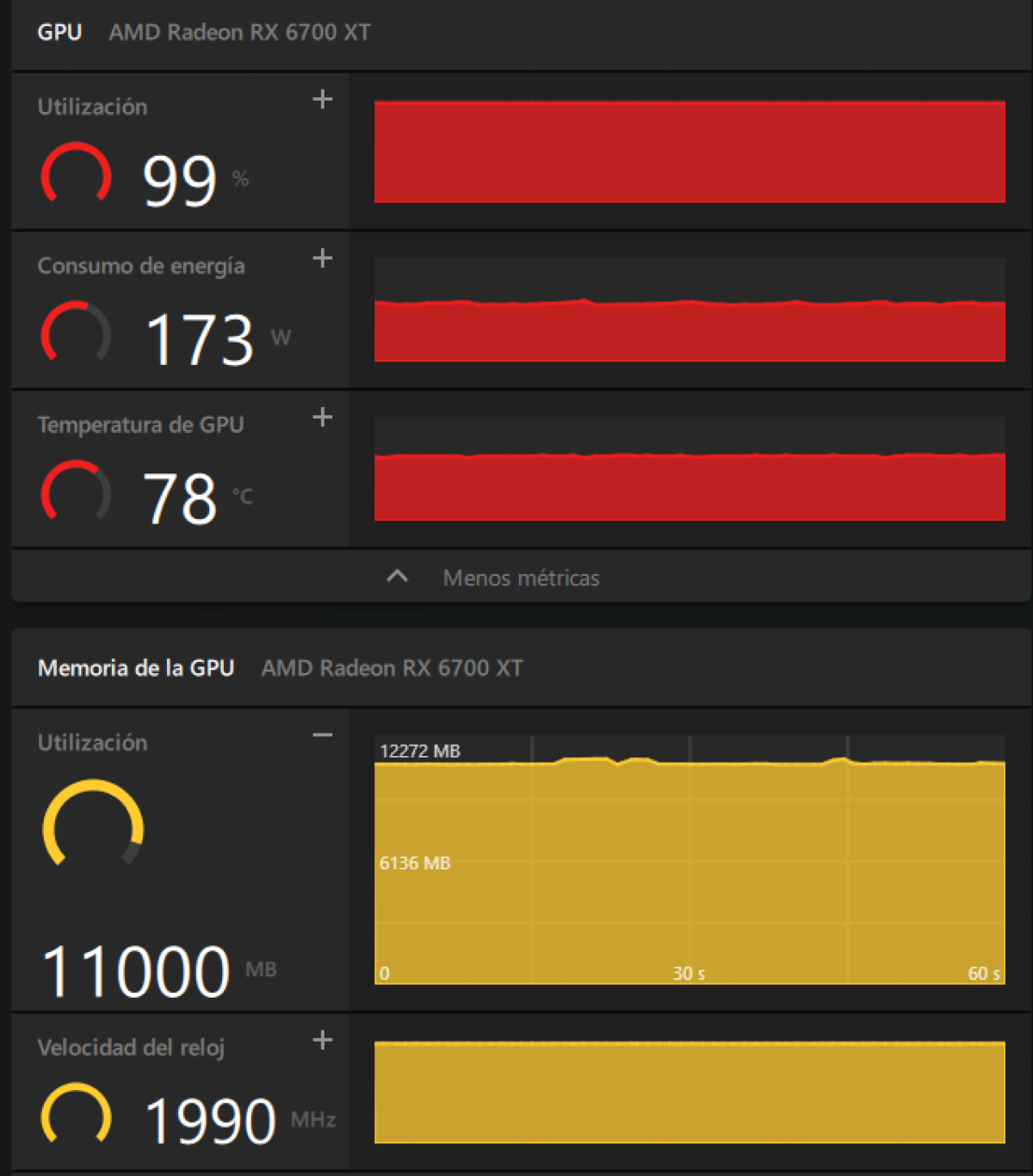
Let's assume I understand all this—it's not necessary, but from what I could gather in my brief research: -ngl 99 pushes all the model layers (models have layers) to VRAM; -c 40960 reserves 40k context tokens; fa on enables flash attention (a specific feature), and --cache-type-k q8_0 --cache-type-v q8_0 quantize the KV cache: that pair of flags is what allows 40k of context to fit into 12 GB of VRAM with an RX 6700 XT. The important thing is that this is enough to run a relatively modern model, large enough and with a sufficient context window to do what I want. Remember, this is on an unsupported AMD card and running on Windows.
A screenshot of my RX 6700 XT's VRAM while running Qwen 3 (Model) 8b (parameters) on Q5_K_XL (quantization) with 40k context and KV cache set to q8 (at this point, it's just a matter of taking it on faith). Of the 12 GB of VRAM, the model plus the cache use up about 9.
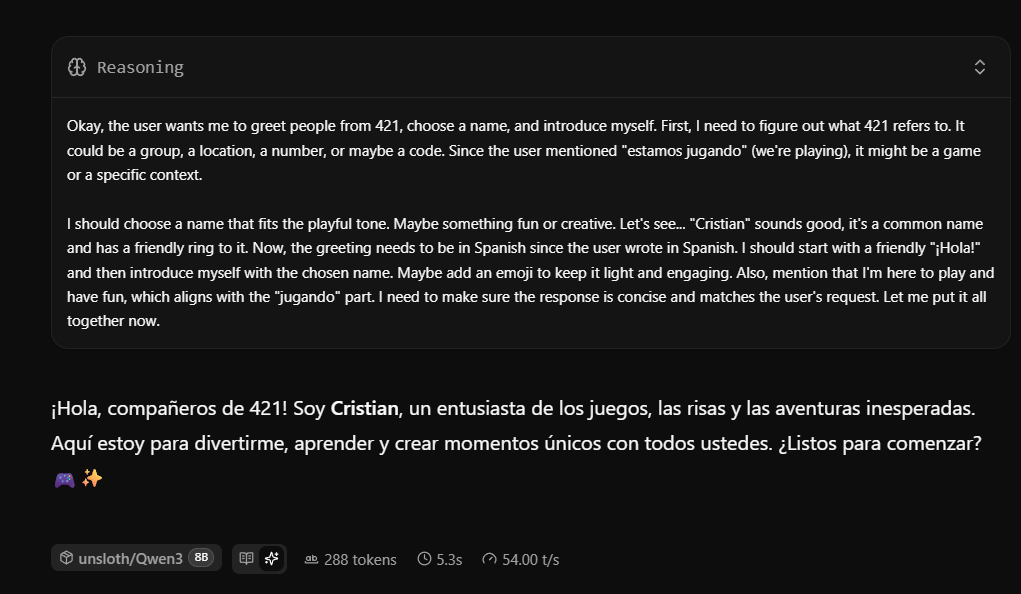
I don't want to bore anyone, and you don't need to install anything—I just want you to get a feel for how this works. So far, we have llama.cpp with a model loaded into VRAM. As it stands, you could already interact with the model directly. You’d just have to go to your browser and enter http ://127.0.0.1:8080/ (without a space). Llama.cpp looks something like this:
He says his name is Cristian, who knows. It's worth noting that I asked the model (Chinese) in Spanish, it "thought" in English, and replied in Spanish.
Although it uses VRAM, it only consumes power while computing a response. In this case, for 5.3 seconds. It processes 54 tokens per second. That’s pretty good—it’s about two or three times the speed of human reading. But using it as-is doesn’t work for me; I want to use it for a specific purpose without breaking anything. In the repository accompanying this post, for those who want to play around with this, if you download it and install it by opening the folder (with Python installed) and running `pip install e `, everything should be installed. This registers the obsidian-agent commands on your computer and lets you run them (you have to open and close the console). Everything is ready; for convenience, all that’s left is to set up a keyboard shortcut to call the model without typing anything—I do that with PowerToys.
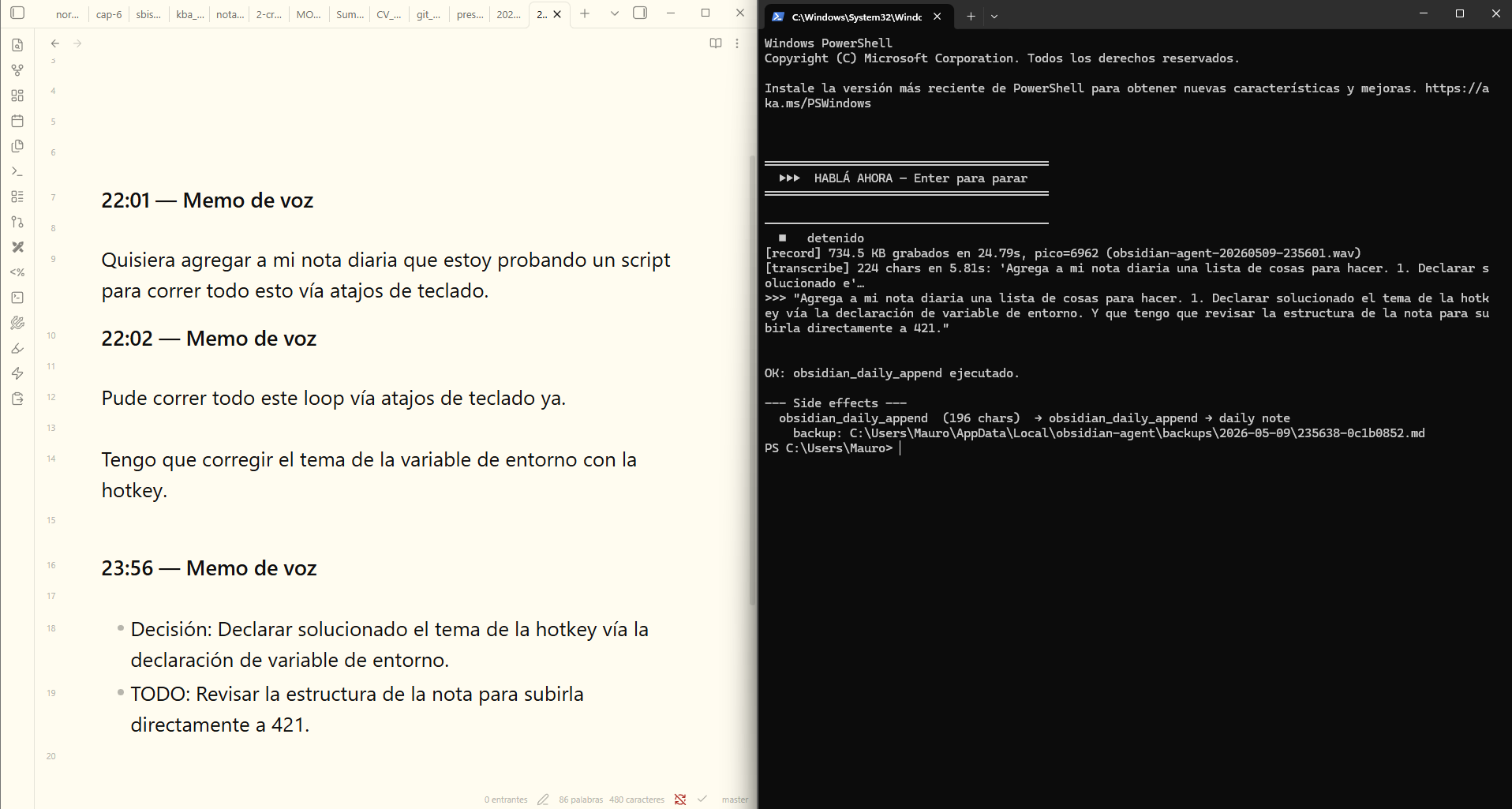
The flow is like this: I'm reading, something comes to mind, I hit Ctrl+Shift+Q, say out loud "note in my daily note a list of things I need to do: first I have a meeting with a friend, then with a thesis student, and at 5:30 PM I need to be at the Faculty to give a class", I hit Enter, and a few seconds later that idea is added to the end of today's daily note, properly formatted as a list. If instead I say "find the last note in the vault and summarize the content for me", the agent starts the loop: it searches, reads the freshest note, and returns the summary in the console. It's not perfect: whisper gets confused with uncommon proper names and sometimes the agent repeats searches before cutting off. But as a mechanism to not lose the idea between thinking it and getting to the keyboard, it works, and all the computation happened inside my computer.
The script opens a terminal, plays a little sound that prompts me to “speak,” I describe what I want, and it adds it to the daily note (a note for random jottings that's set up in Obsidian). When I finish describing what I want (simply by speaking into my computer’s microphone), I press Enter, the recording ends, it’s sent to Whisper, then to Qwen, and Qwen runs the scripts from the repo and adds the info to my note.
I haven't tried it with this humble project, but running a model on my desktop computer as a home server would easily allow me to connect via LAN at home, or even connect securely from practically anywhere to my local model.
Qwen as a natural language interface to my Obsidian vault via pi
What I did try was connecting a harness, a program that serves as an interface to transform a model into an assistant or agent (like Claude Code, Codex, or Gemini CLI), specifically pi. I also tried Hermes Agent, and there's OpenCode (which was recommended to me by Ramiro, a friend who really knows his stuff). I used pi because I’m not quite ready (yet) to handle the context window that Hermes requires, which is at least 60k, nor the versatility of OpenCode. With a bit of work configuring pi (a good part of the setup was done by Claude), it looks like this:
Pi.dev with the quantized qwen3-8b loaded on my RX 6700 XT graphics card. The fluctuations in the visualizer (bottom left) show how the VRAM is being utilized (after the model loads, top left), and how it consumes more electricity and puts my card to work when I interact (right side of the screen) with the pi console, running on the Linux subsystem (WSL) of Windows.
What you see there is like a pretty dangerous local Claude Code because it's a bit dumb. But if you add skills (a topic for another day) and/or connect a more powerful model (like a 30b Qwen or a 27+ Gemma 4), it can become quite useful. In my case, I easily see it as a kind of natural language interface with my Obsidian vault; I can ask it to access my files, summarize them, write new ones, etc. The point is that it’s possible.
Local models today
Yes, you can run useful language models at home today, and things are going to improve. If you have a recent NVIDIA card, a Mac with a good M chip, or you're about to buy a new laptop with certain specifications, you have almost everything you need. If not, you can start with smaller models and get the hang of the ecosystem (ollama, vllm, llama.cpp, whisper.cpp) while you wait for a 30b model that runs comfortably on 16 GB of VRAM, probably in a few months.
The important thing is not that you can replace Claude Opus, ChatGPT 5.5, or Gemini 3.1 with an RTX 4070 today (you can’t, and you won’t be able to for a while). The important thing is that for many tasks, an Opus isn’t necessary, and the list keeps growing every month. The question shifts from "Is privacy possible with LLMs?" (there are many more sophisticated options, like the one that Nico from PNYX, another friend, is working on, which involves anonymizing your data locally with a small model before passing the prompt to a remote model) to: "How much do I care?", "How much does it cost?" and "Is it worth it?". These are questions that companies, universities, and the State should also consider before becoming dependent on systems that compute on the other side of the planet.
✦ Suscribite
Las notas de 421 no tienen paywall
Y a cada colaborador se le paga por su trabajo. Las dos cosas dependen de los suscriptores.
Filósofo. Docente en la UBA e investigador en el IIF-SADAF (CONICET). Le interesa la relación entre normas y significado, además evalúa modelos de lenguaje.